Sentinel Area Sensor
This sensor listens over the phone's Bluetooth radio. If Bluetooth is turned off or not allowed, it cannot see new devices at all, and Sentinel Circle reports the sensor as not working rather than guessing. It also listens only while Sentinel Circle is open on the screen: when you leave the app it stops watching, and its monitor keeps its last state. Keep Bluetooth switched on, and Sentinel Circle open, for the whole time monitoring runs.
Alerts when a Bluetooth device that was not present at startup appears nearby. Unlike the other sensors, you don't pick a specific target — Sentinel Area learns what's normal and flags anything new. On iPhone it watches Bluetooth devices only; Wi-Fi networks cannot be watched.
Details
How it works
When monitoring starts, and again each time you come back to the app, the sensor spends a short learning period recording every Bluetooth device it can hear. Everything it finds counts as normal. After that, if a device appears that was not on that list and its signal is strong enough, the sensor reports it. The alert goes off the moment such a device is detected, with no waiting period, and clears once the device has gone undetected for the presence timeout.
Configuration
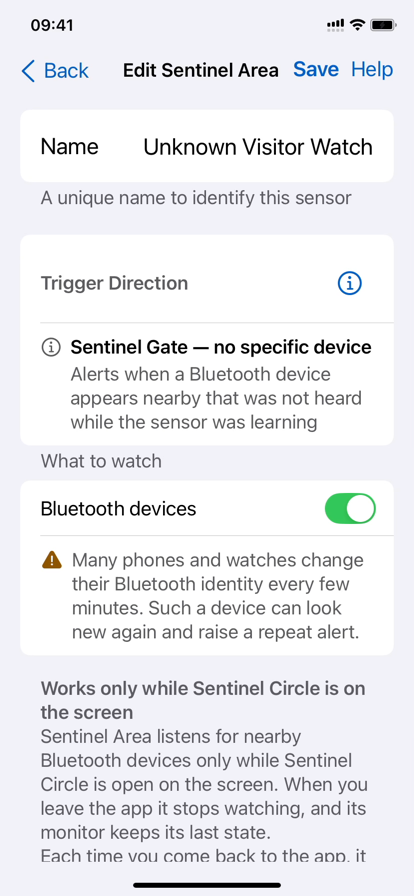
- What to watch — Bluetooth devices (the only choice on iPhone).
- Learning time (seconds) (Advanced) — how long to record what is normally nearby before watching starts (default 90; 60 to 900). Longer is safer: an incomplete list makes ordinary devices look new.
- Minimum signal strength (0-100) (Advanced) — only a device stronger than this can raise an alert, roughly one close to this phone (default 0). Weaker devices are still recorded as normal.
- Presence timeout (seconds) (Advanced) — how long a device may go unheard before it no longer counts as nearby (default 90). It only decides when the alert clears; detection itself is always immediate. Values below 45 act as 45.
Sentinel Area never waits before alerting, so there is no alert delay to set. Only one Sentinel Area sensor runs at a time: if two are enabled, only the first is started.
Requires
- Bluetooth switched on and allowed for Sentinel Circle. No location permission is needed.
Two things to expect
- The list of normal devices is learned fresh each time you open the app, so anyone already present at that moment counts as normal and will not raise an alert. The sensor can alert only after learning has finished.
- Many phones and watches change their Bluetooth identity every few minutes, which can make a device that never left look new again and raise a repeat alert.
Sentinel Area always works in Sentinel Gate Mode — it alerts when an unrecognized device appears, never on something disappearing. See Trigger Direction.