Display Settings
How Sentinel Circle looks: the language of its interface, the light or dark theme, and whether its screens rotate.
Best for: changing the language, matching the app to the iPhone's light or dark appearance, or fixing the screen in one orientation on a phone propped up in a stand.
Details
These three settings live in the Appearance section of Application Settings (Settings → Application). They stay available while monitoring is running.
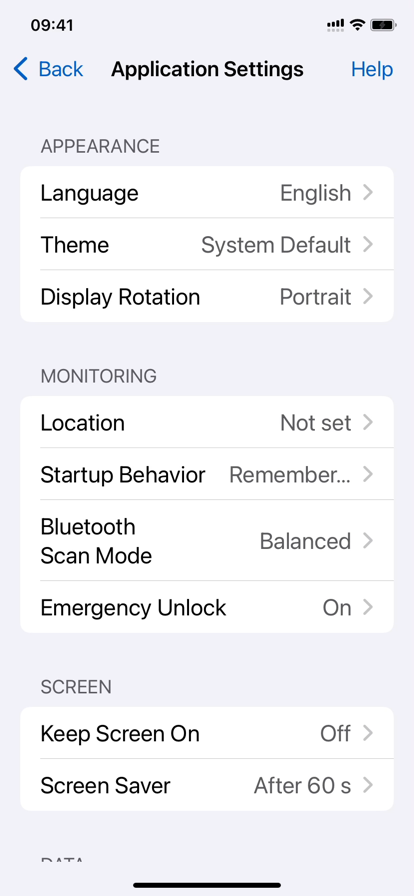
Language
Sentinel Circle is available in 30 languages: Arabic, Bengali, Chinese (Simplified), Chinese (Traditional), Czech, Danish, Dutch, English, Finnish, French, German, Greek, Hindi, Hungarian, Indonesian, Italian, Japanese, Korean, Norwegian, Polish, Portuguese, Romanian, Russian, Spanish, Swedish, Thai, Turkish, Ukrainian, Urdu and Vietnamese. Arabic and Urdu are shown right to left.
On iPhone the language is an iOS setting for the app. The Language row shows the language Sentinel Circle is using now. Tapping it opens a list that starts with Device language, followed by the languages above, each under its English name and its own name. Choosing an entry does not change the language inside the app. Instead it opens Sentinel Circle's page in the iPhone's Settings app, where you pick the language for this app.
Until you pick one there, Sentinel Circle follows your iPhone's language. If that language is not one of the 30, the app is shown in English. Changing it for Sentinel Circle does not affect the iPhone's own language.
Translations are community-contributed, and the app says so under the selector.
Theme
Three choices: System Default (follows the iPhone's light or dark appearance), Light and Dark. This is purely cosmetic and has no effect on monitoring.
Display Rotation
The Disable display rotation switch keeps Sentinel Circle's screens in one fixed orientation instead of following the phone as it is turned. While it is on, you also choose the orientation: Portrait or Landscape. Turn the switch off and the row reads Automatic: the screens follow the phone.
New installs start with the screens locked to portrait.