Tiers & Upgrading
Sentinel Circle has two plans: Free (the 30-day trial, limited to a small number of enabled items) and Standard (a one-time purchase, no limits). Upgrading is a single App Store purchase, not a subscription: you pay once and keep it permanently.
Best for: deciding when to upgrade, and what to do if a purchase doesn't come through or you reinstall the app.
Details
Free Trial
- Up to 3 sensors, 2 channels and 1 monitor enabled at a time.
- The limit is on enabled items, not total items. You can always add more than your limit; the extra ones just start out disabled until you free up a slot or upgrade.
- Configuration Backup (Export, Import, Undo) is not offered on the Free plan.
- See The Free Trial for what happens as the 30 days run out.
Standard Tier
Upgrading removes all limits: unlimited sensors, unlimited channels and unlimited monitors. It also unlocks Configuration Backup. It is a one-time purchase, not a subscription. You pay once and keep the plan permanently, with no recurring charge.
How to Upgrade
- Stop monitoring first. Buying is not offered while monitoring runs ("Stop monitoring before purchasing"), because configuration, including your plan, is locked during a session.
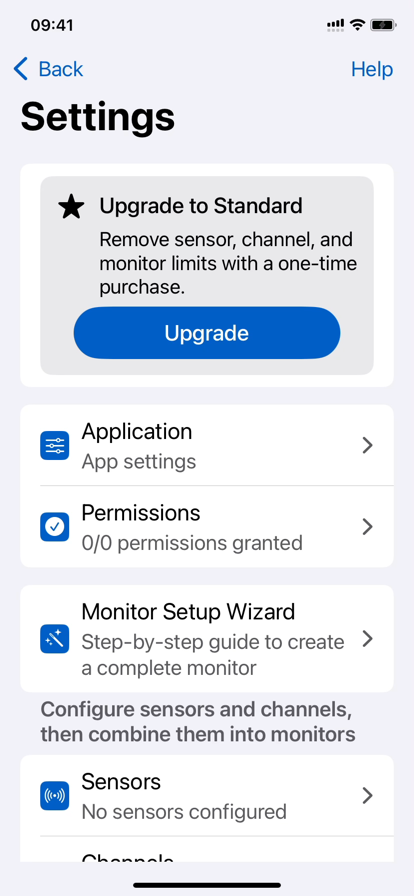
- Open Settings (the gear icon on the Status screen).
- Tap the Upgrade to Standard card at the top, which says "Remove sensor, channel, and monitor limits with a one-time purchase." The Upgrade entry in the ⋯ menu and the Upgrade button in the free-trial notices do the same.
- A dialog shows the price before anything else happens. The price is the App Store's own, in your
currency, followed by the currency code. It also tells you how tax is handled:
- US and Canadian dollars: the price is before tax; the App Store adds any applicable tax at checkout.
- Euro, pound, Australian dollar and several other currencies: the price includes taxes.
- Any other currency: the App Store may add applicable taxes at checkout.
- Tap Buy. The App Store purchase sheet opens, which handles the entire payment; confirm there. Sentinel Circle never sees your payment details.
- After the purchase, all limits are lifted immediately, and you can enable any previously disabled sensors, channels or monitors.
Choosing a price
At times Standard is offered at two prices. Both unlock exactly the same features. There is no difference at all in what you get.
- The full price (badge "Recommended") is selected by default. If Sentinel Circle is valuable to you and you can afford it, choosing it supports the app's continued development.
- The reduced price is there for anyone for whom the full price is a stretch. Choose it freely: you get the same Standard plan, permanently.
When no reduced price is on offer, the dialog shows the single price:
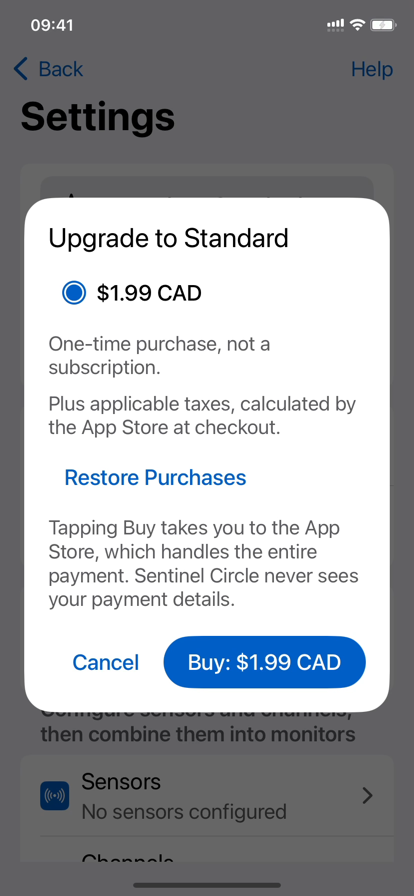
If the dialog says the prices could not be loaded, check your internet connection and tap Retry. If it says the App Store is unavailable, try again later.
If the purchase doesn't finish
- "Waiting for approval": Standard unlocks as soon as the purchase is approved.
- "A purchase is still open": finish or close the App Store sheet, then try again.
- "The purchase could not be completed": try again later.
- "Your purchase went through", with Standard turning on as soon as the app can save it: nothing more to pay.
Restore Purchases
If you reinstall the app, or move to a new iPhone signed in with the same Apple ID, you do not need to buy again. Open the upgrade dialog and tap Restore Purchases. The app tells you the result: "Your purchase was restored. Standard is active.", or "No purchase of Sentinel Circle was found for this Apple ID.", or that restoring failed and to check your connection. This holds whichever price you paid, including a reduced price that is no longer on offer. Like buying, restoring is not offered while monitoring runs.
About Payment
Sentinel Circle does not process payments. When you tap Buy, the App Store handles the entire transaction. Your payment method, pricing, receipts and refunds are managed by Apple, not by this app.